ICS Validator: Check Your Calendar File
Use this free ICS validator to check an .ics or iCal file before importing it. Find error lines and repair suggestions, right in your browser.
Paste the full file, or drop one .ics / .ical file here. Up to 2 MB.
Validation results
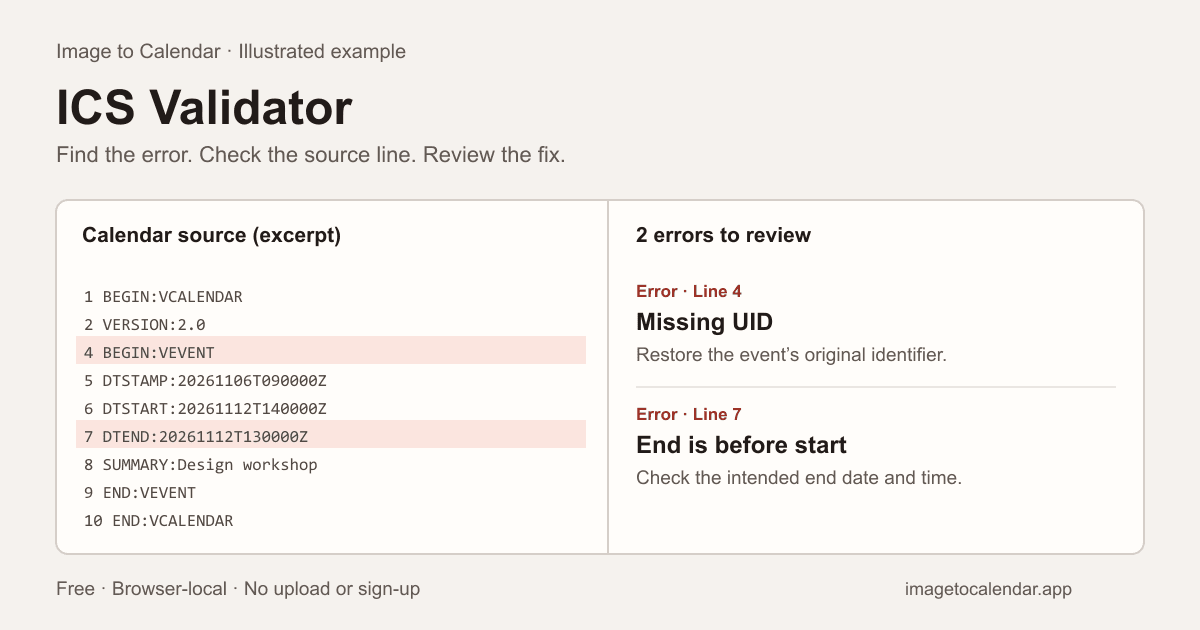
Example results0 warnings · Results for the fictional example.
- Error
VEVENT is missing UID.
For an existing event, restore its original UID. For a new event, add a unique identifier such as UID:your-uuid@example.com and keep it for future updates.
- Error
DTEND must be later than DTSTART.
Correct the end date/time. An all-day DTEND is the first day excluded from the event.
Free. No account or credits. Calendar contents stay in this tab and are not saved.
What this ICS validator checks
- Unclosed or mismatched BEGIN / END components.
- Required VERSION, PRODID, UID and DTSTAMP fields, plus DTSTART where required.
- Impossible dates, invalid time formats and end times before their start.
- Common recurrence rule errors, conflicting duration fields and missing time zone definitions.
- Repeated UIDs with the same recurrence identity, without mistaking series exceptions for duplicates.
Make the next import easier
Start with the errors, then review the warnings. Click a line number to find the source, edit the calendar text, and run the check again. Try the two fictional examples above to see a missing UID and a meeting that ends before it starts.
Formatting fixes keep your event content intact. Missing identities, uncertain dates and time zone changes need a deliberate edit or a fresh export from the original calendar.
This tool checks common rules from RFC 5545, the iCalendar standard. It is a practical checker, not a complete conformance certification or an import guarantee.
How to use this ICS validator
Keep a backup of your original calendar before editing. An ICS validator checks the file you provide; it cannot recover events that were omitted from an export or confirm an appointment with its organizer.
- Open a file or paste its contents. Choose one .ics or .ical file up to 2 MB. If your export is a ZIP archive, extract a calendar file first. Include the complete VCALENDAR wrapper when pasting; an isolated event fragment is not a complete calendar.
- Read the current results. File selection runs the check automatically. After a text edit, select Check calendar to update the report. Click a line number to select the affected source line. The example results are clearly labeled until you replace the fictional input.
- Fix errors, then review warnings. Correct the specific property or get a fresh export. Use Fix formatting for line endings and empty lines. It leaves event dates, identities and time zones as written, then checks the formatted text again.
- Download and test the checked ICS. Download becomes available when the current report has no errors and is not truncated. Review any remaining warnings, then try the file in a separate calendar before adding it to your main schedule.
What do ICS validator errors mean?
The most useful fix depends on the property named in the report. Use this reference to decide what to change. Formatting a file cannot supply missing event details.
| Reported issue | What to check |
|---|---|
| Missing UID | For an existing event, restore its original identifier from the exporter. For a new event, add a unique UID and keep it for later updates. Changing an existing UID may create a duplicate event. |
| Invalid DTSTART or DTEND | Use a real date and the appropriate iCalendar value type. A complete UTC start property looks like DTSTART:20261112T140000Z; an all-day start uses DTSTART;VALUE=DATE:20261112. |
| End before start | Check the date as well as the clock time, especially for overnight events. For an all-day event, DTEND is the first day excluded. |
| Invalid RRULE | Check FREQ, positive COUNT and INTERVAL values, and the rule parts named in your source. Use either COUNT or UNTIL to end a series. |
| Unclosed component | Match each BEGIN with the correct END in nesting order. A fresh export is safer than guessing where a truncated event ends. |
| Missing time zone definition | Review the TZID and its VTIMEZONE component. Some apps recognize named zones without a definition; other imports may behave differently. |
For example, a meeting starting at 14:00 and ending at 13:00 on the same date needs a deliberate correction. The intended end might be 15:00, or the event might continue into the next day. The report identifies the conflict; you decide which date and time are correct.
Why won’t my ICS file import into Google Calendar?
If Google Calendar reports zero imported events, check the file structure and the number of VEVENT records first. The ICS validator can identify common format problems and show whether it found any event entries. A calendar containing tasks or free/busy information may contain no events to import.
After correcting the file, use Google Calendar’s import settings on a computer and choose the intended destination calendar. Extract individual .ics files from a ZIP export before importing them. See Google’s calendar import instructions for the current steps.
If importing still fails after a clean report, check the app’s error message, destination permissions and whether the events already exist. This validator does not check every iCalendar rule or certify that an app will accept the file. Importing is a snapshot, so later changes to the original file will not update those imported events automatically.
For a file you created from scratch, generate a new ICS event with the intended details instead of inventing missing values. If you need to inspect calendar entries as rows, convert the ICS to CSV after resolving format errors.
ICS validator questions
How do I validate an ICS file?
Open an .ics or .ical file, drag it into the editor, or paste its full text and select Check calendar. Read the errors and warnings, then click a line number to select the affected source line. Edit the text and check again. If you explore an example after entering your own calendar, use Restore your calendar to return to it. Clear removes both the current input and any saved input from this tab. Files are limited to 2 MB; repeating events are not expanded into individual occurrences.
Are ICS validator and iCal validator the same tool?
Yes. ICS is the common file extension for iCalendar data. This iCal validator reads the same calendar format used by Google Calendar, Outlook and Apple Calendar. It checks common RFC 5545 rules rather than proprietary calendar database files.
Why does Google Calendar import zero events or reject my ICS file?
A truncated file, missing VCALENDAR wrapper, invalid dates, or missing event fields can cause import problems. Look at the errors here first. A task-only calendar contains no VEVENT entries to import as events. Passing these checks does not guarantee an import: app-specific limits, account permissions and duplicate detection can also affect the result.
What is the difference between an error and a warning?
Errors indicate a broken structure or a violation of a supported format rule, such as a missing UID or an end before its start. Warnings identify compatibility risks or details to review, such as an untitled event, a missing time zone definition or repeated event identities. Some calendar apps accept files with errors; that does not make the underlying data correct.
Can this tool fix a broken calendar file?
Fix formatting removes a leading UTF-8 byte-order mark and empty lines, and converts line endings to CRLF. It rechecks the result immediately. It does not invent UIDs, add timestamps, guess dates, remove duplicate events or rewrite time zones. Follow the suggestions to correct event errors manually, then download the checked ICS when no errors remain. Keep your original backup.
Is this a complete RFC 5545 compliance test?
No. This checker covers component nesting, selected required properties, duplicate singleton fields, key date-time values, common RRULE errors and event boundaries, with additional syntax parsing. Time zone definitions are checked for presence, not simulated. Recurrence instances, scheduling protocols, all parameter constraints and every component-specific rule are not fully validated. It cannot guarantee how a calendar app will import your file.
Is my calendar uploaded or saved?
File reading, validation and formatting happen locally in your browser. Your input stays in tab memory, including a temporary copy when you explore an example. The tool does not send calendar contents or filenames to a validation service, connect to your calendar account or save them in browser storage. Clear removes the current input, temporary copy and results; refreshing restores the fictional example. The site may collect ordinary page analytics. No sign-in or credits are needed.
Can ChatGPT generate a valid ICS file, and how do I check it?
ChatGPT can draft iCalendar text, but the output still needs validation and a comparison with your intended schedule. Ask for plain ICS content without Markdown fences, explicit dates and time zones, and stable UIDs for existing events. Paste the result into this ICS validator, fix reported errors, and inspect the title, duration and repeat pattern yourself. Passing a format check cannot prove that the generated dates match what you meant. Use fictional or redacted details when seeking help with a private calendar.
Why are my imported events at the wrong time?
Check whether DTSTART is a UTC time ending in Z, a local time with TZID, or a floating time with neither. These represent different meanings. Adding Z to a local clock time changes its meaning; it is not a harmless formatting fix. A missing VTIMEZONE definition can also affect compatibility. The validator flags selected time zone problems, but does not calculate every daylight-saving transition or verify that the chosen zone matches your intended location. Re-export ambiguous events rather than guessing an offset.